From Chaos to Control: Managing Microservice Environment Variables in AWS
Introduction
In this article, I share the experience I had with one of the most comprehensive tasks I’ve undertaken from an AWS infrastructure perspective: centralizing environment variables shared among multiple microservices. You will learn about best practices for environment variables and what you should consider when designing a system from scratch.
The Problem
First of all, to give you some general context, it’s important to understand that we are talking about a system with around 40 microservices. I’m making this clear because it’s highly relevant for understanding both the problem and the proposed solution. With this in mind, imagine that in each of those microservices, you have environment variables that, to begin with, are versioned in the code. This means anyone with access to the repository can see these variables, which could include sensitive data, database connection URLs—in short, data that for no reason should be in the code, much less accessible to anyone with repository access.
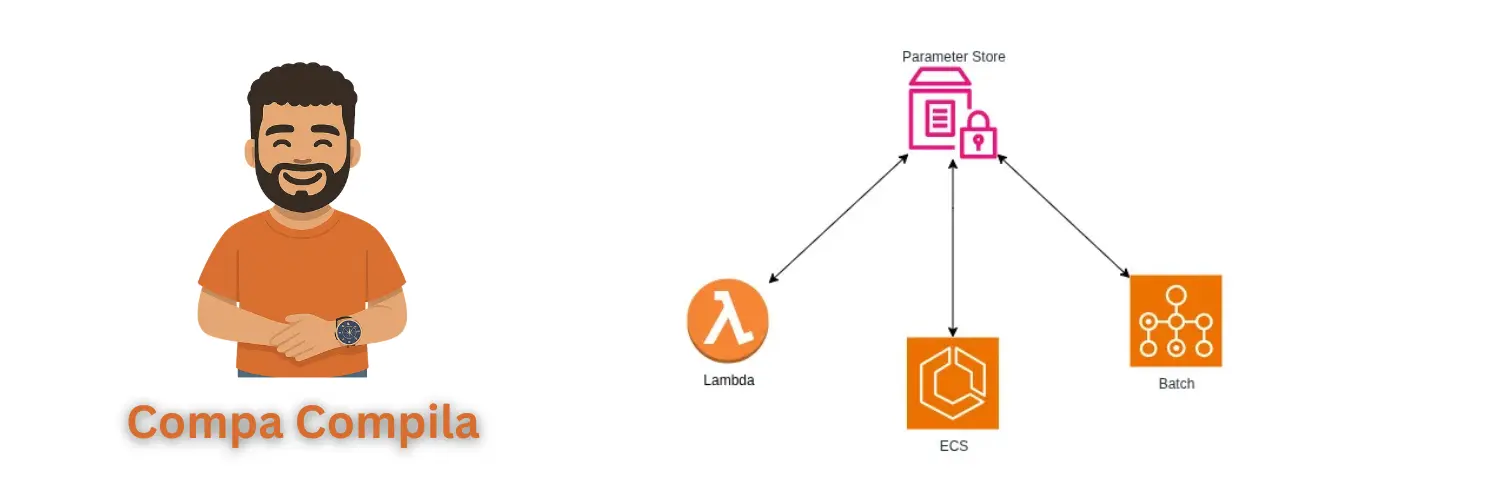
This system had the peculiarity that some microservices were deployed on AWS ECS using EC2, others on AWS Lambda, and others on AWS Batch. This means there are specific considerations for each of these services that we need to account for, which we will see later. So, the idea to operationally improve the system was as follows:
Centralize the environment variables. This way, all microservices get their environment variables from the same source, and if a variable needs to be changed, it’s only changed once. This is a huge improvement, as previously, if an API KEY used by 15 microservices was changed, all 15 microservices had to be redeployed to apply the change. Now, this is no longer necessary.
Implement a mechanism so that when an environment variable is changed, all microservices using it update their value.
The Solution
To implement this, two AWS services were considered: Secrets Manager and Parameter Store. Below is a summary of the differences between them, keeping in mind that either could have solved the problem:
| Secrets Manager | Parameter Store | |
|---|---|---|
| Automatic Rotation | Can be configured for automatic key rotation. | Does not have this built-in functionality, although it can be achieved using other services like AWS EventBridge. |
| Pricing | Each secret costs $0.40 per month, and every 10,000 API calls cost $0.05. | It has two tiers of parameters: standard and advanced. For this application, standard was sufficient. In this case, you get up to 10,000 parameters for free. Beyond that, it’s $0.05 per extra parameter, and API calls for the standard tier are free. |
Implementation
Next, I will show an implementation example to give you a practical idea of this solution.
Environment Variables
sentryDSN: hardcoded value of the Sentry DSN
sentryDSNParameter: /SENTRY/DSN/API_COMPA_COMPILA
The sentryDSN property reflects how each of the environment variables was hardcoded before this solution, and the sentryDSNParameter property reflects the new change, in which the environment variable only references the path where the value was saved in Parameter Store.
Parameter Store
Evidently, each parameter must be created in Parameter Store to be later used by each of the microservices. Following the environment variables example shown previously, it would look something like what is shown below:
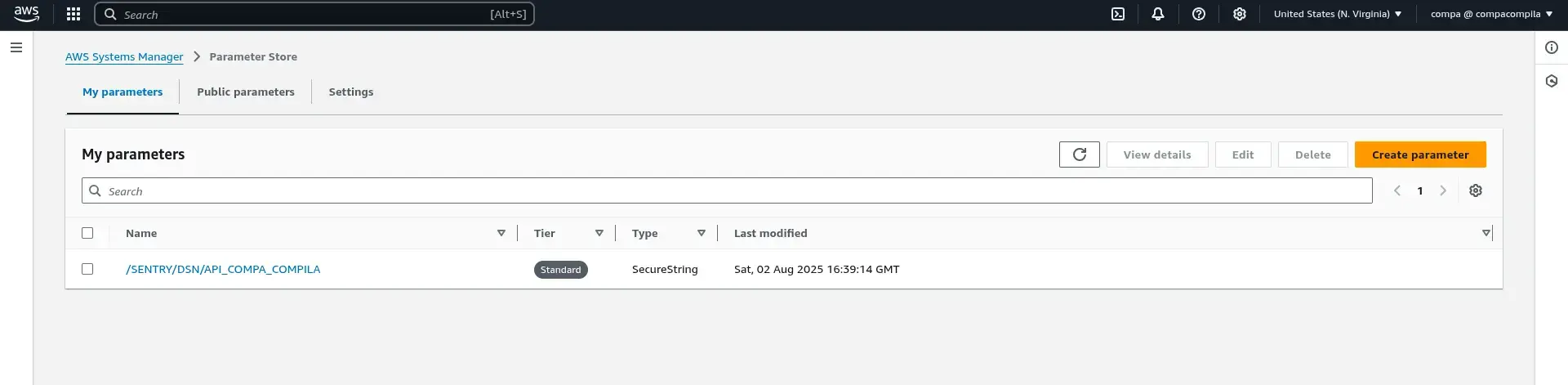
Here, keep in mind that the parameter type is: SecureString. This implies that the value is stored encrypted, so when the value is obtained using the SSM client of the AWS SDK, if it is not specified to decrypt it, then we get the encrypted value.
Keep in mind that if the values are stored encrypted and you want to obtain them decrypted, the role of the service that executes the code (AWS Lambda, AWS ECS, or AWS Batch) must have the
kms:Decryptpermission with the resource that corresponds to the KMS key that was used to encrypt the value. This is selected at the time of creating the parameter.
Obtaining the parameters
Below I show you an example of the service written in Golang to obtain the parameters from Parameter Store:
Model
For this service, two new structs are created:
package model

type RetrievedParameters struct {
	SentryDSN   string
	DatabaseUrl string
}

type ParametersInput struct {
	SentryDSNParameter   string
	DatabaseUrlParameter string
}
Servicio
package parameters
import (
"context"
"fmt"
"github.com/aws/aws-sdk-go-v2/aws"
"github.com/aws/aws-sdk-go-v2/service/ssm"
"github.com/aws/aws-sdk-go-v2/service/ssm/types"
"github.com/elC0mpa/api-compa-compila/model"
)
type ParametersService interface {
GetAllParameters(ctx context.Context) (*model.RetrievedParameters, error)
}
type secrets struct {
sentryDsnName string
databaseUrlName string
svc *ssm.Client
}
func NewParametersService(awsConfig aws.Config, parameters model.ParametersInput) ParametersService {
svc := ssm.NewFromConfig(awsConfig)
return &secrets{
sentryDsnName: parameters.SentryDSNParameter,
databaseUrlName: parameters.DatabaseUrlParameter,
svc: svc,
}
}
func (s *secrets) GetAllParameters(ctx context.Context) (*model.RetrievedParameters, error) {
parameterNames := []string{s.sentryDsnName, s.databaseUrlName}
input := ssm.GetParametersInput{Names: parameterNames, WithDecryption: aws.Bool(true)}
result, err := s.svc.GetParameters(ctx, &input
if err != nil {
return nil, fmt.Errorf("error retrieving parameters: %w", err)
}
if len(result.InvalidParameters) > 0 {
return nil, fmt.Errorf("error retrieving parameter: %s", result.InvalidParameters[0])
}
return s.mapParameters(result.Parameters), nil
}
func (s *secrets) mapParameters(params []types.Parameter) *model.RetrievedParameters {
parameters := model.RetrievedParameters{}
for _, parameter := range params {
if *parameter.Name == s.sentryDsnName {
parameters.SentryDSN = *parameter.Value
continue
}
parameters.DatabaseUrl = *parameter.Value
}
return ¶meters
}This service is responsible for receiving the names of the parameters that this microservice needs through the ParametersInput struct. Once it receives these parameter names, it uses them to get the values from Parameter Store, and then returns them in the RetrievedParameters struct.
It should be noted that due to the way this was designed, regardless of whether the microservice is a Lambda, a container running on ECS, or a Batch Job, this is called at startup. This means that once the microservice is up, it is not continuously reading from Parameter Store to check if any of the variables have changed. For this reason, in a future article, we will discuss the mechanism that was implemented so that when a parameter is changed using Parameter Store, the microservices that use it are automatically updated with its new value.
Benefits
Security
The first and, I would say, the greatest benefit that this change introduced was related to security, and although it’s self-explanatory, I’ll show you why. There are always very sensitive values that do not need to be accessible to everyone who has access to a repository, much less for the Production environment. With this change, the values are only in Parameter Store, and each developer will only have access to the parameters for which their IAM permissions allow it. Therefore, this is the main benefit of this change.
Operability
The other advantage is related to the ease of operation of the system as a whole. The point is this: suppose that 15 of the 40 microservices connect to the same SQL database, and suddenly for some reason the host of this database changes. In that case, previously, each of the 15 microservices had to be redeployed to update the value of the database host. However, with this new improvement, you only have to change the value in the parameter declared in Parameter Store.
Conclusions
That’s all for this article. I hope I’ve been able to provide you with something useful; this is one of the most impactful changes I’ve made as a software architect. See you in the next article.
Related Content
- The Small Change That Made a Big Impact
- Practical Application of CloudFront Functions
- Deploying Our Blog in a Serverless Way
- Selecting the Tool to Develop This Blog
- Three AWS Associate Certifications in Six Months: My SysOps Admin Experience and Beyond