S3 Bucket Versioning: Advantages and Implications
Introduction
In the previous article of this series, we discussed lifecycle rules and their importance in saving on S3-related costs in an operationally simple way. In this article, we will be talking about S3 bucket versioning, one of the key points to understand how S3 buckets work and how we can make the most of them.
Behavior of S3 Buckets Without Versioning
By default, when we create an S3 bucket, versioning is not enabled. This has the following consequences:
Suppose we have an object named
image.jpgin the root of our bucket. If we upload another object with the same name to the root of our bucket, the existing object is overwritten, precisely because we do not have versioning enabled.If we accidentally delete an object from our bucket, we have no way to recover it because versioning is not enabled.
Why Is Versioning S3 Buckets a Good Practice?
Once we enable versioning on our S3 bucket, the following changes occur:
Versioning is enabled at the Bucket level.
If we delete an object, instead of permanently removing it, S3 inserts a
delete marker, which becomes the current version of the object. This way, we can recover the previous version.If we overwrite an object, S3 adds a new version of the object to the bucket. The previous versions of the object remain available, and therefore we can recover them if we wish.
It is important to note that normal S3 storage charges apply to each version of an object. Therefore, if we have three versions of an object, we will be charged for three objects.
When you enable versioning on an S3 bucket for the first time, it may take a some time for the change to fully propagated. During this process, you might receive HTTP 404 errors for requests to create or update objects. AWS recommends waiting 15 minutes after enabling versioning on a bucket before performing
PUTorDELETEoperations on objects in the bucket.
Buckets with Suspended Versioning
Once versioning is enabled on an S3 bucket, it cannot be disabled, only suspended. When this happens, the existing objects in the bucket do not change; only the way the bucket handles subsequent objects changes. Let’s look at the different scenarios to consider if a bucket has versioning suspended:
Adding Objects
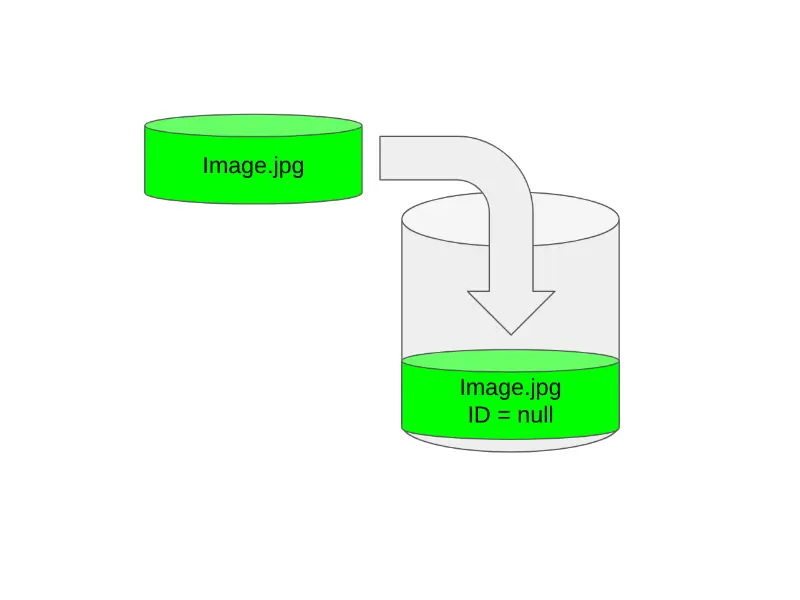
When we add objects to an S3 bucket with versioning suspended, S3 adds a null version ID to each added object. This is shown in the following image:
It’s important to emphasize that this new object replaces the previous one if and only if the version ID of the previous object is also null. Let’s look at an image to understand this better:
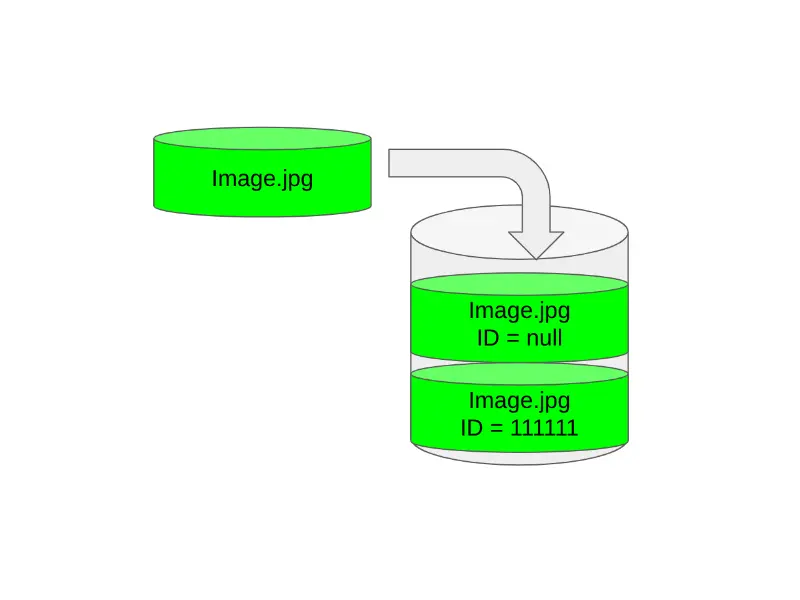
After understanding this, we can conclude that when we add objects to a bucket with suspended versioning, the objects that were stored before versioning was suspended are not overwritten, as they are saved with a non-null version ID. However, the ones we store after versioning is suspended are overwritten, as they all have a null version ID.
Retrieving Objects
Whenever objects are retrieved from an S3 bucket, it returns the current version of the object regardless of the bucket’s versioning status. Therefore, in this case, there are no differences related to the bucket’s versioning.
Deleting Objects
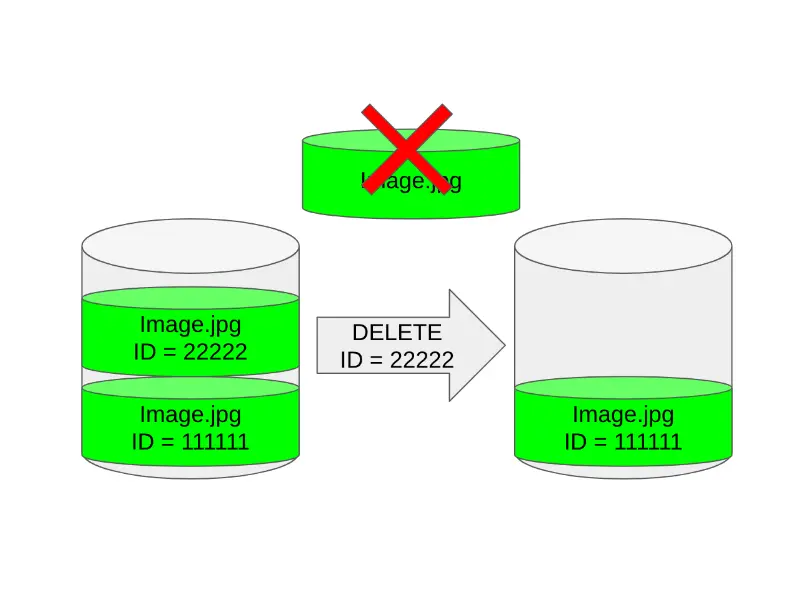
When a bucket has versioning suspended, a DELETE request will do the following:
- It permanently deletes the object only if its version ID is
null. - If the object has a non-
nullversion ID, it adds adelete marker.
To permanently delete an object with a non-null version ID, you must include the version id in your request.
Best Practices
To prevent performance issues related to versioning, the following is recommended:
Enable a lifecycle rule that expires previous versions of objects. For example, a lifecycle rule that expires noncurrent versions of an object 30 days after they become noncurrent.
Enable a lifecycle rule that removes expired
delete markers.
See you soon
This is all for now regarding the fourth article in this series, where I will be providing you with a complete guide to S3 buckets. In the next article, we will be talking about S3 bucket policy. See you soon.
Related Content
- Lifecycle Policies in S3 Buckets
- S3 Storage Classes
- What Are S3 Buckets and What Are They For?
- Practical Application of CloudFront Functions
- Deploying Our Blog in a Serverless Way