Practical Application of CloudFront Functions

Introduction
In this series I show you how I developed this blog from scratch, and in the previous article I explain how to deploy a static website using S3 Buckets and CloudFront Distributions. In this article, I will show you how I solved a problem related to navigation using Cloudfront functions.
Navigation Problem
Let’s remember that up to this point, we have all the files of our static site stored in our S3 Bucket and CloudFront is what serves the files to the browser. Now we need to understand how the combination of these two services works.
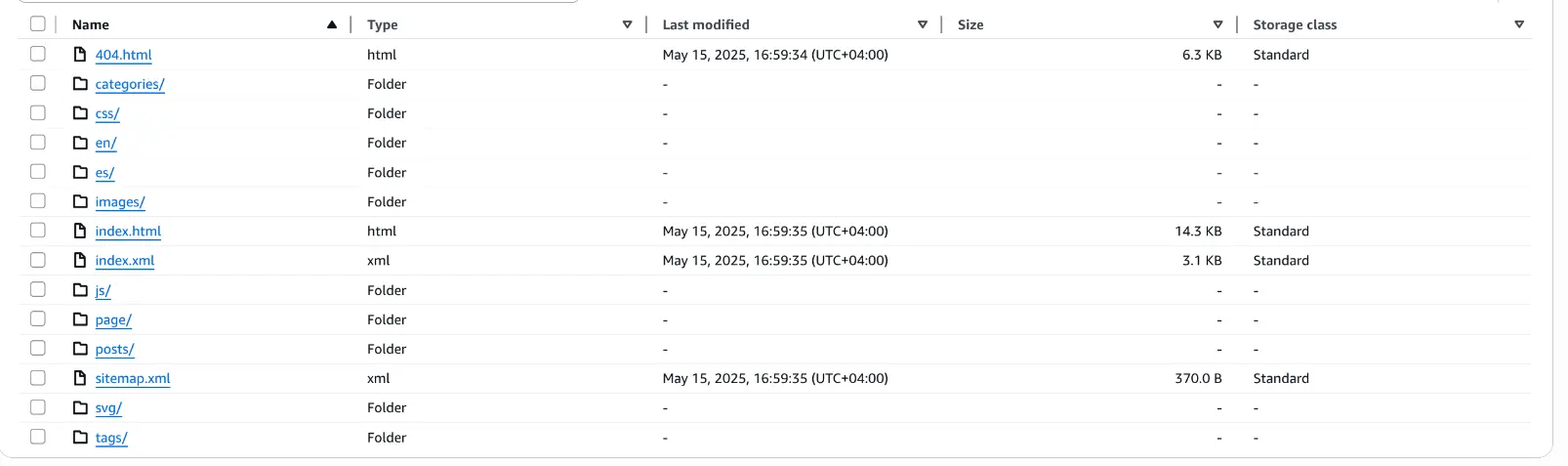
In the previous image, we can see the content of our static site. We have to understand that our CloudFront distribution responds to a specific domain, in our case, the domain is https://compacompila.com, which corresponds to the root of our S3 bucket. That is, if we want CloudFront to serve our website, we should access https://compacompila.com/index.html, keeping in mind that the index.html is in the root of our bucket. But, if so, why when we access the blog without index.html in the URL does CloudFront still return this file?

The image above shows the answer to this question, and it’s that this configuration tells CloudFront which file to return if the root (/) of the Cloudfront distribution is accessed. So far so good, but let’s see what happens when we navigate to a path that is not the root of the distribution.

As we can see in the image above, the browser accesses the URL https://compacompila.com/posts/deploy-static-websites-serverless/, and therefore CloudFront accesses the path /posts/deploy-static-websites-serverless/ in the S3 bucket. Let’s see what we have in that path in the S3 bucket.

In the image above, we see that in this folder we have, among other files, the index.html, which is the file that CloudFront needs to return to be able to render this page in the browser. And this is where CloudFront functions come in.
CloudFront Functions
CloudFront functions are small, very fast functions that run at CloudFront’s edge locations. These last on the order of milliseconds and the idea is to be able to make slight modifications to the requests and responses in our distribution. There are four hooks related to CloudFront functions:
- Viewer request
- Viewer response
- Origin request
- Origin response
I will dedicate another post to explaining when we should use each of these hooks, but now it’s enough to use the 1st one, Viewer request. The reason is as follows, if our browser, instead of accessing CloudFront through the path /posts/deploy-static-websites-serverless/, accessed it through /posts/deploy-static-websites-serverless/index.html, our problem would be solved, since CloudFront would directly access the file and that view could be rendered in the browser. In this case, we want to modify the request made by the browser, and in this case, the browser is the viewer.
Developing our CloudFront function
We must never forget the fact that our CloudFront functions should always perform slight modifications that do not imply a great delay in our traffic. Below is our CloudFront function:
function handler(event) {
    var request = event.request;
    var uri = request.uri;

    // Check if URI is missing a file name (no extension) or ends with a slash
    if (uri.endsWith('/')) {
        // If URI ends with a slash, append 'index.html'
        request.uri += 'index.html';
    }
    return request;
}
As we can see, with this function we ensure that index.html is always added to the end of our path, and thus our problem is solved.
See you soon
That’s all for now. In the next article, I will give you the step-by-step instructions you need to carry out everything I have explained in this series. Remember that the best way you can help me is by leaving a comment. I would also like to know what you are interested in learning about AWS to keep it in mind for future articles. See you soon.